How to Download Instagram Videos on iPhone

iPhone has no built-in way to save someone else's Instagram video, and you don't need an app for it. Here's how to download any public Instagram video straight to your iPhone using Safari.
Step by step
- Copy the link in Instagram. In the Instagram app, open the video or reel, tap the ⋯ (or paper-plane) icon, and choose Copy link.
- Open SaveJet in Safari. Open Safari, go to SaveJet, and paste the link into the box at the top. No app to install, no login.
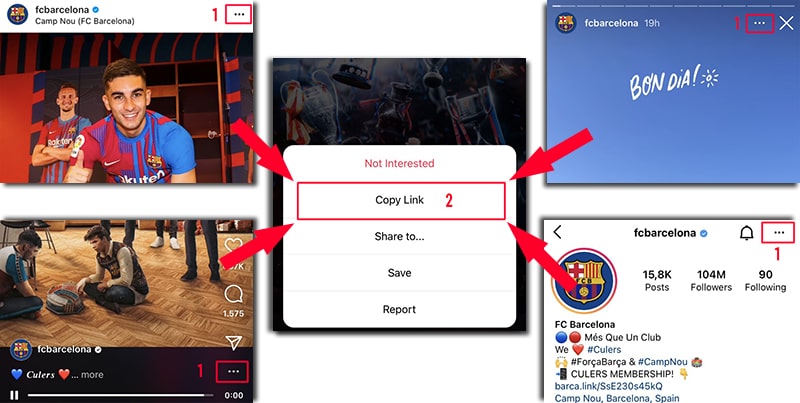
On Instagram, open the ⋯ menu (or share icon) and tap Copy Link — it works on posts, reels, stories, and profiles. - Download to your iPhone. Tap Download. Safari saves the MP4 to your Files app; choose Photos if you'd rather it land in your camera roll.
What you actually get on iPhone
- Format: MP4 video, saved by Safari's own downloader.
- Quality: the highest-quality rendition Instagram makes publicly available, typically up to 1080p.
- Where it lands: Files → Downloads by default; move it to Photos in two taps.
- Requirements: Safari (or any iOS browser) — no app, no extension, no Shortcuts setup.
- Account: public videos only; you are never asked for an Instagram username or password.
Where does the video save — Files or Photos?
By default Safari saves the MP4 to the Files app (in Downloads). To put it in your camera roll, open the file and tap Share → Save Video, or pick Photos when prompted. Once the download finishes, the file lives on your iPhone — nothing else is needed.
Reels, stories, and photos on iPhone too
The same Safari method downloads reels, stories, and photos. For stories you paste a public @username instead of a link; for a whole account, use the profile viewer.
Why you don't need an app
An app would ask for storage or login permissions; a browser tool needs neither. SaveJet runs entirely in Safari, never asks for your Instagram password, and only touches public content — so there's nothing to install and nothing on your account to risk. The video itself is streamed straight through to your iPhone rather than kept on SaveJet's servers.