How to Download Instagram Videos

Saving an Instagram video for offline viewing only takes a few seconds. This guide shows how to download any public Instagram video or reel in full HD on iPhone, Android, or computer — free, with its original sound and no watermark.
Step by step
- Open the video on Instagram. Find the video, reel, or post in the Instagram app or on instagram.com. The account must be public.
- Copy the link. Tap the ⋯ (three-dots) or share icon and choose “Copy link”. On a computer, copy the URL from the address bar.
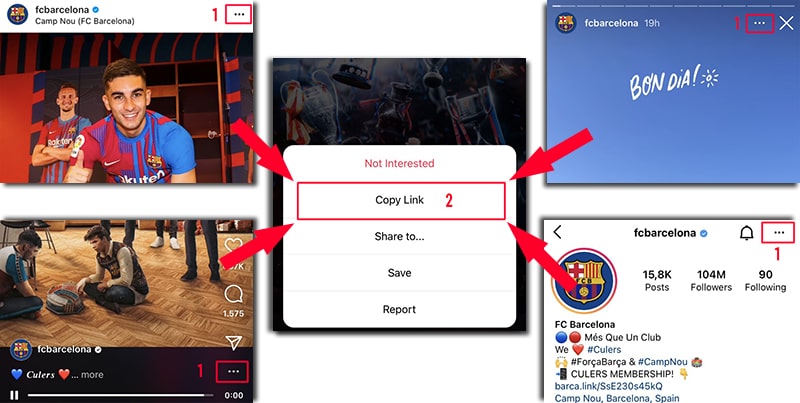
On Instagram, open the ⋯ menu (or share icon) and tap Copy Link — it works on posts, reels, stories, and profiles. - Paste it into SaveJet. Open the video downloader, paste the link, and the video is detected automatically.
- Download in HD. Tap Download to save the MP4 with sound, at the best quality Instagram publishes. To keep only the audio, choose the MP3 option.
What you actually get
- Format: MP4 video, or MP3 if you pick the audio-only option.
- Quality: the highest-quality rendition Instagram makes publicly available, typically up to 1080p.
- Audio: included and untouched — the file is passed through, not re-encoded.
- Watermark: nothing added by SaveJet.
- Account: public videos only; you are never asked for an Instagram username or password.
- Storage: the video is streamed straight through to your device and is not kept on SaveJet's servers.
Can you download Instagram videos with sound?
Yes — a good downloader keeps the audio in the MP4. If you want only the soundtrack (for example a trending sound), use the audio-to-MP3 tool. For short vertical clips specifically, the reels downloader works the same way.
Where do downloaded videos get saved?
On iPhone, Safari saves the MP4 to the Files app. On Android, it goes to your Gallery or Downloads folder. On PC or Mac, it lands in your browser's Downloads folder, ready to play or share.
Why can't a downloader give you the creator's pre-upload version?
Instagram re-encodes video when it is uploaded, and serves viewers a processed rendition rather than the file that left the creator's phone. Every downloader — SaveJet included — can only reach what Instagram publishes, so “the highest public rendition” is the honest ceiling and anything advertised as the untouched original is overstating it. In practice that rendition is typically up to 1080p with the audio intact, which is what you see on Instagram itself.
Is it legal to download Instagram videos?
Downloading public videos for personal, offline use is generally acceptable, but the video belongs to its creator. Don't repost it as your own, respect copyright, and avoid private accounts. Copyright, permission, and Instagram's Terms of Use are separate questions from whether a tool works — treat them separately and use downloads responsibly.