How to Download Instagram Stories

Instagram stories vanish after 24 hours, but you can save them first. This guide shows how to download any public account's stories — anonymously and in original quality — on iPhone, Android, or computer, with no app and no login.
Step by step
- Get the username. Note the public @username whose story you want to save. You can also copy a direct story link from Instagram.
- Enter it in SaveJet. Open the story downloader and type the @username (or paste the story link) into the box.
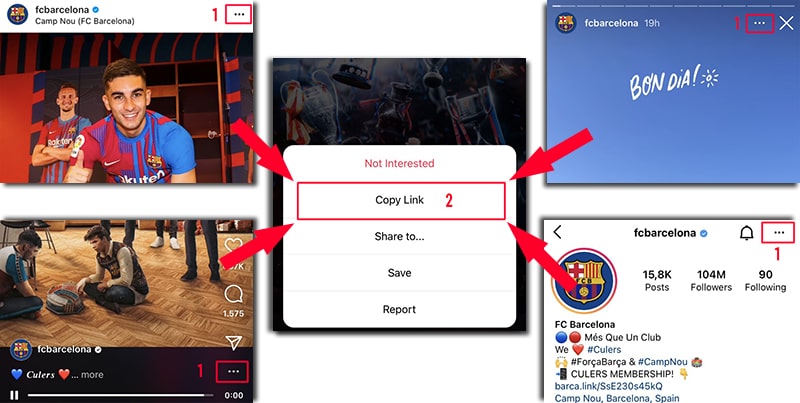
On Instagram, open the ⋯ menu (or share icon) and tap Copy Link — it works on posts, reels, stories, and profiles. - Choose the story. SaveJet loads the account's current stories. Browse them and select the photo or video you want.
- Download it. Tap Download to save the story in original quality — anonymously — saving doesn't register as a view.
Can you download Instagram stories anonymously?
Yes — a tool that doesn't register a view can't add you to the story's viewer list, so saving is anonymous. To simply watch without saving, use the anonymous story viewer; to grab stories a creator kept on their profile, use the highlights downloader.
What if the story already expired?
Once a story is older than 24 hours it disappears and can no longer be downloaded — unless the creator saved it to a highlight, which stays on their profile and can still be saved. So download stories while they are still live.
Where do downloaded stories get saved?
On iPhone, the file goes to the Files app; on Android, to your Gallery or Downloads folder; on PC or Mac, to your browser's Downloads folder. Both photo and video stories are supported.