How to Download Instagram Reels

Instagram's Save button only bookmarks a reel inside the app — it never puts the file on your device. Here's how to download any public reel in full HD, with its audio and no watermark, in a few seconds on any device.
Step by step
- Copy the reel link. Open the reel in the Instagram app or web, tap the ⋯ (share) icon, and choose Copy link. On desktop, copy the URL from the address bar.
- Paste it into SaveJet. Paste the link into the box at the top of the reels downloader. SaveJet detects the reel automatically.
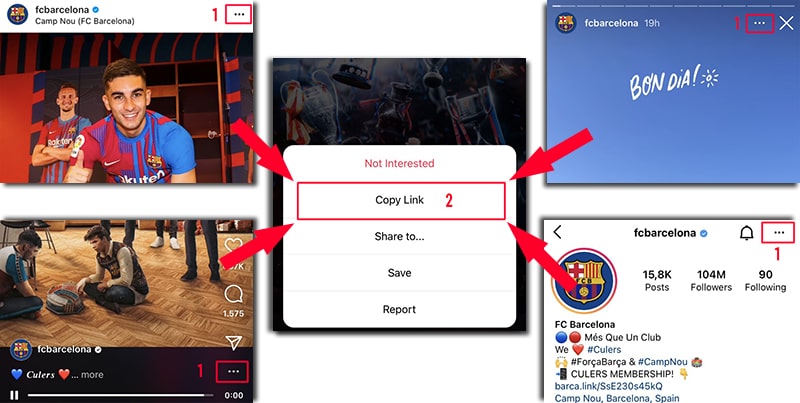
On Instagram, open the ⋯ menu (or share icon) and tap Copy Link — it works on posts, reels, stories, and profiles. - Download in HD. Tap Download to save the reel as an MP4 with sound, or choose MP3 to keep just the audio.
What you actually get
- Format: MP4 video, or MP3 if you pick the audio-only option.
- Quality: the highest-quality rendition Instagram makes publicly available, typically up to 1080p — the file is passed through, not re-encoded.
- Audio: included and untouched.
- Watermark: nothing added by SaveJet.
- Account: public reels only; you are never asked for an Instagram username or password.
- Storage: the reel is streamed straight through to your device and is not kept on SaveJet's servers.
Can you download Instagram reels with sound?
Yes. SaveJet keeps the reel's audio in the downloaded MP4, so trending songs and voiceovers stay intact. If you only want the soundtrack, use the reel-to-MP3 tool to save the audio on its own.
How to download reels on iPhone, Android, and PC
iPhone: copy the reel link, paste it into SaveJet in Safari, tap Download — it saves to your Files app. Android: the MP4 saves to your Gallery or Downloads. PC / Mac: it saves to your Downloads folder. No app or extension on any device. The same steps work for regular videos and stories.
Save vs download: what's the difference?
Instagram's bookmark icon adds a reel to your private Saved collections. That is a pointer, not a file: it lives inside your Instagram account, needs a connection to view, and vanishes if the creator deletes the post or makes the account private. Downloading puts the actual MP4 in your camera roll or Downloads folder, where it plays offline and stays yours. Use the dedicated reels downloader for the full experience, including MP3 extraction and HD quality.