How to Download Instagram Photos

Instagram lets you bookmark a photo to your saved collection, but there is no built-in way to put someone else's photo on your device. This guide shows how to download any public Instagram photo in full size on iPhone, Android, or computer — no app and no login required.
Step by step
- Open the photo on Instagram. Find the post in the Instagram app or on instagram.com. It must be from a public account.
- Copy the post link. Tap the ⋯ (three-dots) menu above the post and choose “Copy link”. On a computer, copy the URL from your browser's address bar.
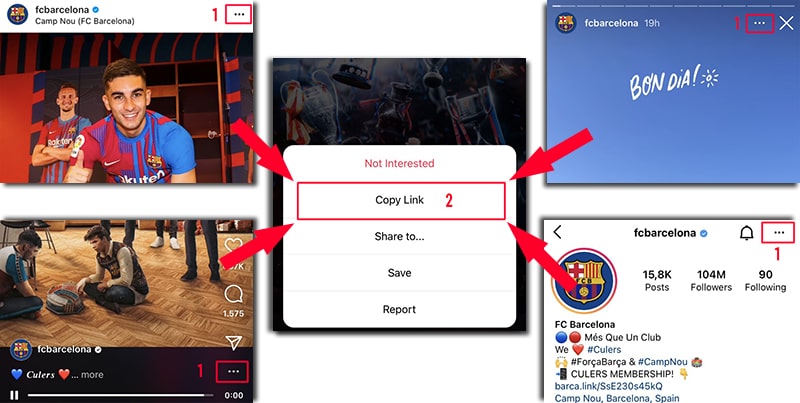
On Instagram, open the ⋯ menu (or share icon) and tap Copy Link — it works on posts, reels, stories, and profiles. - Paste it into SaveJet. Open the photo downloader, paste the link into the box, and the post is detected automatically.
- Download the photo. Tap Download to save the image as a JPG at the largest size Instagram publishes. For a carousel, download every slide at once as a ZIP.
What you actually get
- Format: JPG for a single photo, ZIP for a whole carousel.
- Quality: the largest rendition Instagram makes publicly available — the full-size image the app itself loads, not a thumbnail.
- Watermark: nothing added by SaveJet.
- Account: public posts only; you are never asked for an Instagram username or password.
- Storage: the image is streamed straight through to your device and is not kept on SaveJet's servers.
Where do downloaded photos get saved?
On iPhone, Safari saves the image to the Files app (or Photos if you choose). On Android, it goes to your Gallery or Downloads folder. On PC or Mac, it lands in your browser's Downloads folder. You can move it anywhere afterwards.
How do you download all photos in a carousel?
Paste a multi-photo (carousel) post link and a tool like the carousel downloader grabs every slide at once as a single ZIP, in album order. To save someone's profile picture in full size, use the profile picture downloader instead.
Saved vs downloaded: what's the difference?
Instagram's bookmark icon adds a post to your private Saved collection. That is a pointer, not a file: it stays inside your Instagram account, needs a connection to open, and disappears if the creator deletes the post or goes private. Downloading puts the actual JPG in your camera roll or Downloads folder, where it stays yours and opens offline.
Is it legal to download Instagram photos?
It depends on where you are and what you do with the file — saving public photos for personal use is widely tolerated, but the images still belong to their creators. Only save content you have the right to use, don't repost it as your own, and respect copyright. Avoid downloading from private accounts. Copyright, permission, and Instagram's Terms of Use are separate questions from whether a tool works — weigh them separately.