How to Download Instagram Highlights

Highlights are the stories a profile keeps under its bio. Here's how to download any public highlight — whole albums, photos and videos — anonymously, at the best quality Instagram publishes.
Step by step
- Enter the username. Type the public @username into the box at the top to open the account.
- Open a highlight. SaveJet loads the profile's highlight albums. Open the one you want and browse its photos and videos.
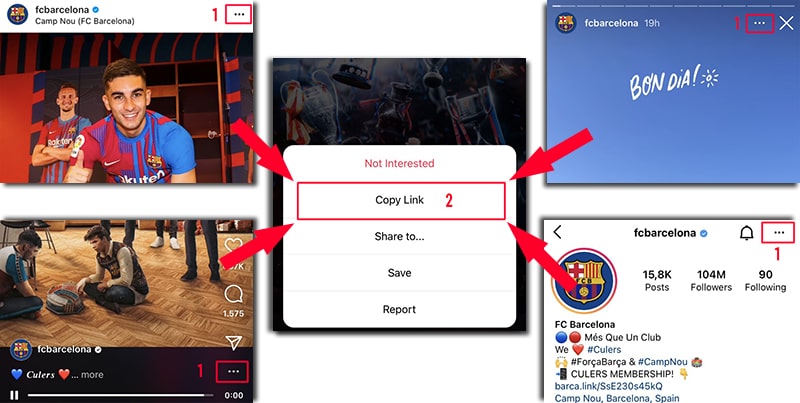
On Instagram, open the ⋯ menu (or share icon) and tap Copy Link — it works on posts, reels, stories, and profiles. - Download in HD. Tap Download on any item, or save the whole album — at the highest quality Instagram publishes, anonymously.
What you actually get
- Format: JPG for photo items, MP4 for video items.
- Quality: the highest-quality rendition Instagram makes publicly available for each item.
- Anonymity: opening a highlight here doesn't register as a view, so you never appear in a viewer list.
- Account: public profiles only; you are never asked for an Instagram username or password.
- Storage: items are streamed straight through to your device and are not kept on SaveJet's servers.
What are Instagram highlights?
Highlights are stories a creator has saved permanently on their profile, grouped into labelled albums under the bio. Unlike live stories that vanish after 24 hours, highlights stay until removed — so you can download them any time the profile is public.
Can you download highlights anonymously?
Yes. Opening a highlight through SaveJet reads the public highlight feed without sending Instagram the signal that marks a story as watched, so viewing here doesn't register as a view and you never appear in anyone's viewer list. Use the highlights downloader to save, or just watch with the anonymous highlight viewer.
How to download highlights on iPhone, Android, and PC
iPhone: enter the @username, open a highlight, tap Download — it saves to your Files or Photos. Android: it saves to your Gallery or Downloads. PC / Mac: it saves to your Downloads folder. No app needed. To grab a creator's profile picture too, use the DP tool.