Does Instagram Notify You When You Screenshot?

Worried someone gets an alert if you screenshot their story or save their post? Here's exactly when Instagram does and doesn't notify screenshots.
Step by step
- Copy the link or username. Copy the post or reel link, or the @username for a story — no login needed.
- Paste into SaveJet. Drop it into SaveJet. It fetches the public media — you never sign in or connect your Instagram account.
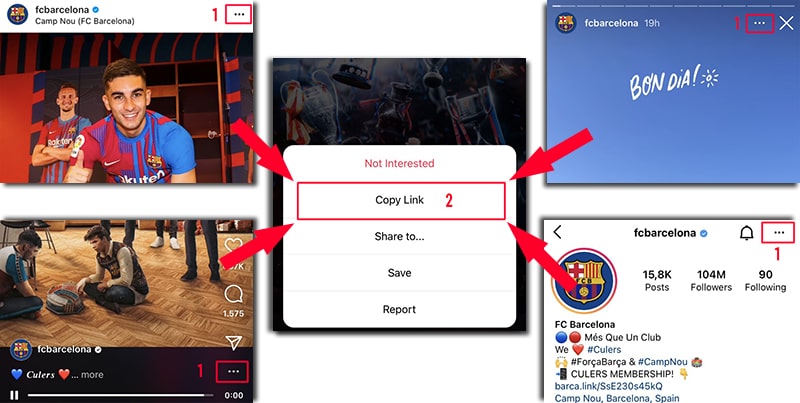
On Instagram, open the ⋯ menu (or share icon) and tap Copy Link — it works on posts, reels, stories, and profiles. - Download silently. Save the photo or video in original quality. The owner gets no notification.
Stories, posts, and reels: no notification
Instagram does not alert anyone when you screenshot or save their stories, feed posts, or reels. You can screenshot freely, and saving the original file with SaveJet is just as silent.
The one exception: vanish-mode DMs
The single place Instagram still notifies screenshots is a disappearing photo or video sent in a vanish-mode direct message. If you screenshot one of those, the sender sees a note. Regular DM messages, stories, and posts do not trigger any alert.
Does downloading notify the user?
No. Whether you screenshot or download with a tool, the account owner is never told. Nothing here registers as a view, and nothing is tied to your identity — view it anonymously with the story viewer if you'd rather not save.